A Tour of Your Novel Studio
By the end of this section you will know what each main area of the NeuroBook page is responsible for, and you will be able to tell whether a task belongs to the editor, the file tree, Plot or the Agent.
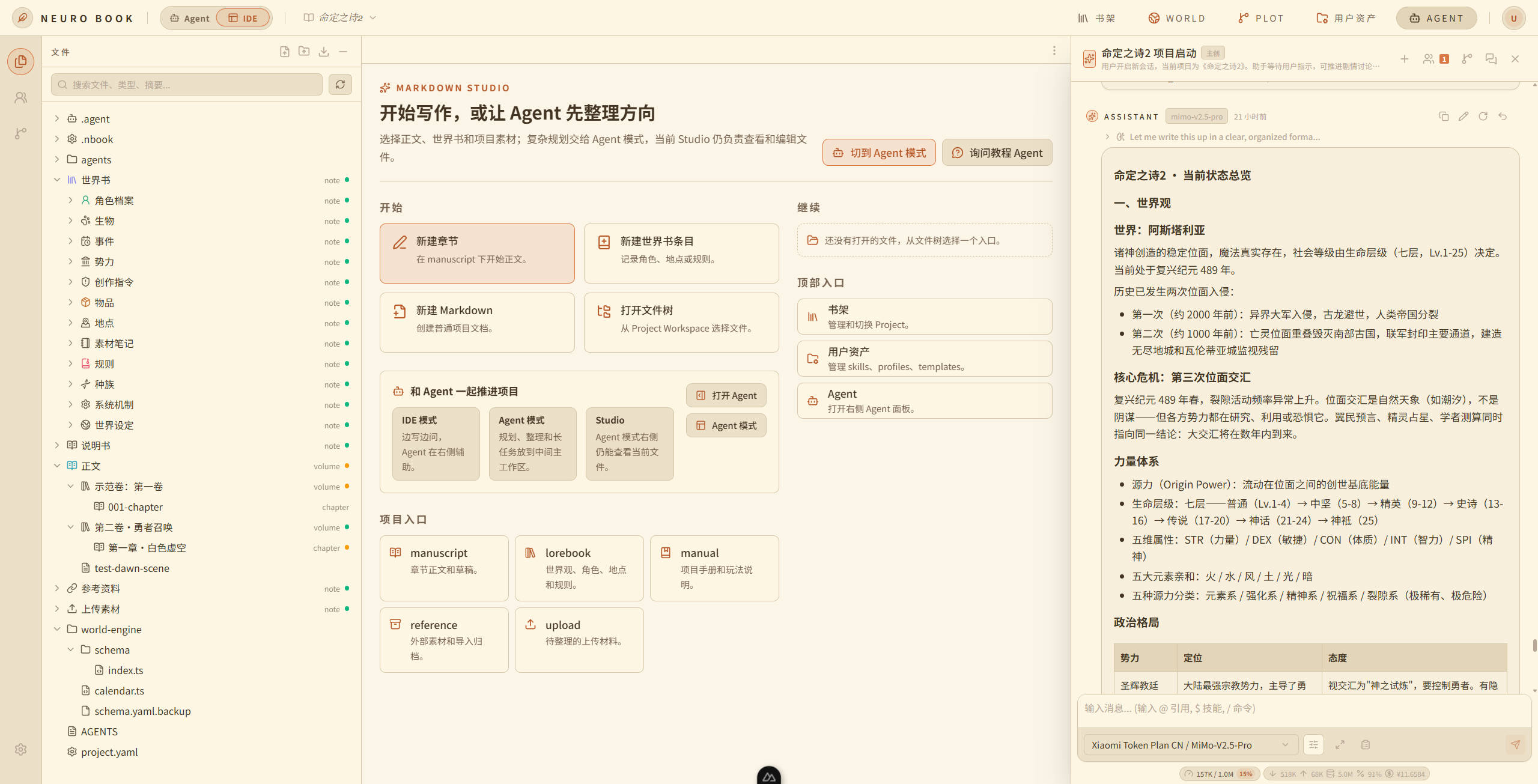
NeuroBook is closer to a novel IDE than to a chat box. It keeps prose, worldbuilding, story structure and Agent collaboration in the same local workspace. You can edit the files directly, and you can also let the Agent read, organize and write those files within clear boundaries.
If you are configuring a model, start with the four configuration steps in Quick Start: each action has its own annotated PNG.
What Is in the Top Bar
From left to right:
| Entry | What it does |
|---|---|
| Bookshelf | Switch between books and create new ones |
| World | The World Engine workbench, for world state that changes |
| Plot | The Plot Workbench: two trees, a promise ledger and decision records |
| Trace | Request tracing: the full record of every model call the Agent makes |
| Jobs | The background job center; the badge shows how many jobs are running |
| Changes | The file change inbox: review what the Agent modified |
| User Assets | Manage profiles, Skills and templates |
| Far right | Agent panel toggle and the account menu (Settings lives here) |
Some buttons collapse automatically when the window is narrow.
The Home Page and Projects
The first thing to pay attention to after opening the app is the current Project Workspace. Every book is a separate project, usually at workspace/{project}/, containing lorebook/, manuscript/, world-engine/, agents/, manual/, reference/, upload/ and .nbook/.
Think of the Project Workspace as the studio for this one book:
project.yaml: the book's name, synopsis and project identity. The system generates it and you rarely need to touch it.lorebook/: stable settings such as characters, places, items, factions and world rules.manuscript/: draft prose and chapters.world-engine/: World Engine configuration (time format and subject schema). State that changes with the story is recorded by the system in the timeline that lives here.agents/: per-profile project context, memory that survives across sessions, and programmatically generated recommendations.manual/: explanatory material aimed at readers and players, such as optional character avatars.reference/: external material, import archives and low-confidence migration material.upload/: raw files uploaded by you.
Markdown Studio
Markdown Studio is the main editing surface for prose and worldbuilding. NeuroBook treats Markdown files as the long-term truth while giving you an editing experience closer to real writing software.
You write chapter prose here, and you edit worldbook entries here too. Source mode suits precise work on Markdown, frontmatter and references; rich text mode suits getting words down.
The File Tree
The file tree shows you the real directory layout of the Project Workspace. Unlike tools that hide everything inside a database, NeuroBook wants you to understand the file structure, because the Agent reads and writes content by these same paths.
The directories you look at most while writing:
lorebook/: the manual for your world.manuscript/: chapter prose.world-engine/: dynamic world state and the timeline. You usually query it by talking to the Agent rather than reading files — the files themselves are only the calendar and schema configuration.
The Plot Workbench
The Plot button in the top bar opens the Plot Workbench. It manages long-term story structure. It is not the source of truth for dynamic world state, and it does not replace your prose or your worldbook.
It uses two trees to separate two questions. The carrier tree covers where the story is told (volume → chapter → prose); the causal tree covers why things happen (phase → thread → scene). The two trees meet at "which chapter does this scene belong to", so you can arrange flashbacks, cutaways and parallel threads however you like without tangling the causal chain.
The workbench also holds two ledgers. The promise ledger tracks every setup as a debt you owe the reader (planted / advanced / fulfilled), and decision records archive why you made a given creative call. For the full explanation, see Plot Workbench.
The main writing chain is: design the plot → after you confirm it, advance the World Engine (write the confirmed dynamic facts into the timeline) → update Plot (Thread / Scene / Chapter) → call writer to produce the prose. When you are ready to write a real chapter, have the Agent walk this whole chain rather than jumping straight to writer.
The Agent Drawer
The Agent drawer is where you collaborate with the AI. You can have leader understand your intent, call a Skill, look up your worldbuilding, create a linked agent, or hand a chapter to writer.
For a few recurring concepts, an intuition is enough for now:
- Agent: one AI working unit you can keep collaborating with.
- session: one conversation or work record with a given Agent.
- profile: defines an Agent's role, tool permissions and prompt boundaries.
- Skill: a reusable procedure card that teaches the Agent how to do a certain kind of task.
- World Engine: the source of truth for dynamic world state and the timeline. You just tell the story, and the Agent records the confirmed facts into the timeline for you. You can ask directly, "what state is this character in now" or "what did this place look like two hundred years ago", without understanding anything about how it works underneath.
The next section uses these concepts to create your first book.